ChatGPT for Students: Ways to Use the GenAI Tool to Enhance Your Learning
Discover how students can use ChatGPT’s Study Mode to improve learning, understand complex topics, build study plans, and get career support while keeping key AI considerations in mind.
![[Featured Image] A woman sits at a table and uses ChatGPT for students on her laptop.](https://d3njjcbhbojbot.cloudfront.net/api/utilities/v1/imageproxy/https://images.ctfassets.net/wp1lcwdav1p1/73FKgA6zgJOizbN1rlb2C8/18d6bab867199d46aeeb690e35604cd5/GettyImages-1131374781.jpg?w=1500&h=680&q=60&fit=fill&f=faces&fm=jpg&fl=progressive&auto=format%2Ccompress&dpr=1&w=1000)
Key takeaways
Students can use OpenAI’s popular generative AI tool ChatGPT to achieve different academic and career goals.
Students can activate “Study Mode” on ChatGPT to use the tool to prepare for assignments and tests in a way that cultivates greater understanding [1].
Students can also use ChatGPT to create study plans, better understand difficult concepts, and get job application support.
As with all GenAI outputs, students should double-check ChatGPT information for accuracy.
Learn more about ChatGPT for students, including helpful prompts to get started with the tool. Afterward, strengthen your learning abilities with Vanderbilt University’s Accelerate Your Learning with ChatGPT. Co-taught by professors Barbara Oakley and Jules White, you’ll learn how to create engaging study hooks, connect ideas to personal experiences, and expand your working memory capacity using AI.
What is ChatGPT for students?
Many users prompt ChatGPT in a way that provides them with fast answers. But for students intent on developing or strengthening their knowledge, there are different ways to use the tool.
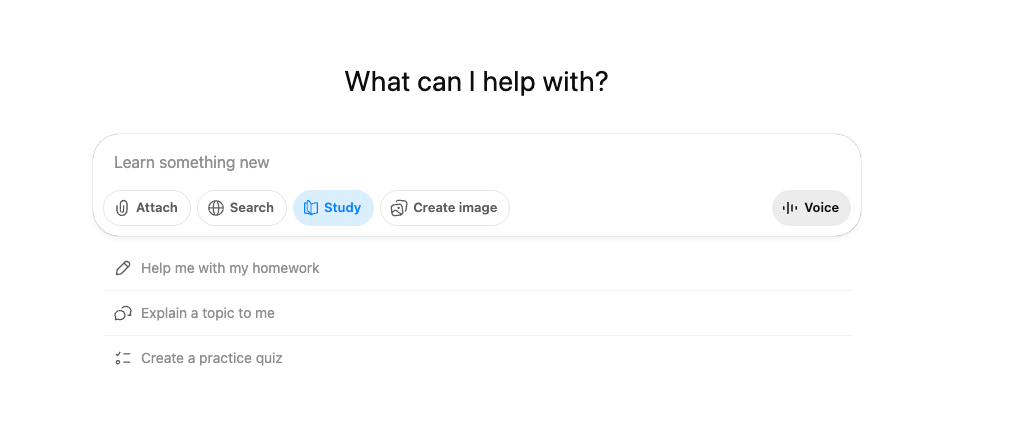
“Study Mode” is a specific setting within ChatGPT designed for students—or anyone looking to learn about a subject. When activated, “Study Mode” will employ different learning techniques to ensure you’re grasping the material and can actively recall and explain it [1].
How do you access ChatGPT’s Study Mode?
You can activate “Study Mode” by selecting “Study” in ChatGPT’s chat settings. From there, ChatGPT will provide three pre-set options: “Help me with my homework,” “Explain a topic to me,” or “Create a practice quiz.”
What are different ways students can use ChatGPT?
Students can use ChatGPT to address their different academic needs or to get career support.
6 ways students can use ChatGPT for academic support
OpenAI likens ChatGPT for students to a “study partner” you can use for all facets of your academic life, including creating a study schedule, brainstorming, and working through problems step-by-step. Some different use cases include:
Researching
Initial topic exploration and brainstorming
Finding credible sources and research directions
Explaining complex concepts in simpler terms
Getting background context on unfamiliar subjects
Writing support
Brainstorming ideas and outlines
Grammar and style feedback
Help with structure and organization
Vocabulary and word choice suggestions
Studying
Planning a study schedule
Check your learning progress
Creating practice questions and quizzes
Explaining difficult concepts from multiple angles
Generating mnemonics and memory aids
Summarizing long texts or lectures
Learning a foreign language
Practicing conversation and pronunciation
Explaining grammar
Providing cultural contexts
Helping with translation
Problem-solving
Working through math problems step-by-step
Coding assistance and debugging
Analyzing case studies
Exploring different perspectives on issues
Supporting creative project development
Story ideation and creative writing prompts
Art project concepts
Presentation ideas and formats
Learn more: Reimagining Work and Learning with AI: Expert Insights from Dr. Jules White
3 ways students can use ChatGPT for career support
Beyond learning, ChatGPT can be a useful tool to explore careers, refine your job application materials, and generate helpful scripts to improve your networking. Some career support use cases include:
Career development
Exploring career paths and job market insights
Identifying transferable skills from coursework and prior experience
Creating professional development goals
Networking conversation starters and scripts
Practicing salary negotiation strategies
Building personal brand messaging
Job search
Researching companies and industry trends
Optimizing LinkedIn profiles and professional bios
Job applications
Tailoring resumes for specific positions
Writing compelling cover letters
Preparing for common interview questions
Crafting follow-up emails after interviews
Sample prompts to get started with ChatGPT for students
Writing strong ChatGPT prompts to get the most out of your time with the tool is important. As much as possible, provide context, explain what ChatGPT’s role should be, and outline any constraints the LLM should be aware of to get the best possible outputs. Use the sample prompts below as guides.
Academic sample prompt
"I need to write a 10-page research paper on the impact of social media on teenage mental health. Can you help me create an outline with 7 main sections, suggest 3-4 key points for each section, and identify what types of sources I should look for to support each point?"
Scheduling sample prompt
"I have three exams coming up: Biology (cell biology and genetics) on March 15th, Statistics (hypothesis testing and regression) on March 18th, and Spanish (past tenses and vocabulary) on March 20th. I have 2 hours available each weekday and 4 hours each weekend day. Can you create a detailed study schedule that breaks down what I should focus on each day?"
Career support sample prompt
"I'm a junior majoring in psychology with experience in peer tutoring, research assistance, and volunteer work at a crisis helpline. I'm interested in either clinical psychology or UX research careers. Can you help me identify transferable skills from my experiences and suggest 3-4 internship types that would help me explore both paths?"
Important considerations when using ChatGPT as a student
As with any GenAI tool, it’s important to be aware of ChatGPT’s limitations, especially for students seeking to learn. Keep the following considerations in mind as you use ChatGPT in Study Mode.
1. Fact-checking and hallucinations
ChatGPT can sometimes generate incorrect information or fabricate sources that don't exist. Always verify facts, statistics, and citations before including them in your work. Treat ChatGPT's responses as starting points that require confirmation, not definitive answers.
2. Academic integrity and plagiarism
Submitting AI-generated work as your own is a form of plagiarism that may violate your university’s academic integrity policy. Check your school's specific guidelines about AI tool usage before using. If you have any doubts, ask your instructors before using AI assistance and make sure to disclose such usage as needed.
3. Over-reliance
While ChatGPT is a powerful tool, becoming too dependent on it can weaken your own analytical and problem-solving skills. Use it to enhance your thinking process, not replace it. Always engage critically with the responses and develop your own insights.
4. Privacy and data security
Conversations may be stored and used for training purposes, so treat it like a public forum rather than a private workspace. Avoid sharing sensitive personal information, proprietary research, or confidential data when using ChatGPT.
5. Limited perspective and potential for bias
ChatGPT's responses can reflect biases present in its training data and may not represent diverse perspectives [2]. Seek out multiple viewpoints, especially on controversial topics, and consult human experts and diverse sources for well-rounded understanding.
6. Information cutoff dates
ChatGPT's knowledge has cutoff dates and may not include the most recent developments in rapidly evolving fields [3]. Always check for updated information, especially for current events, recent research, or fast-changing industries like technology.
Bolster your academic career with Coursera’s free resources
Check out the Career Resource Hub to explore quizzes to help you decide on career paths, online courses, and more.
Subscribe to Coursera's LinkedIn newsletter, Career Chat, to stay up-to-date on industry trends, career advancement tips, and more.
Visit Coursera's Youtube channel to hear from established professionals in various fields and compare certificate programs.
Whether you want to develop a new skill, get comfortable with an in-demand technology, or advance your abilities, keep growing with a Coursera Plus subscription. You’ll get access to over 10,000 flexible courses.



Coursera Staff
Editorial Team
Coursera’s editorial team is comprised of highly experienced professional editors, writers, and fact...
This content has been made available for informational purposes only. Learners are advised to conduct additional research to ensure that courses and other credentials pursued meet their personal, professional, and financial goals.